Custom colour picker palettes in WordPress
Most of the websites that we build include a CMS (content management system) to enable our clients to update the contents of their websites. Generally this includes a WYSIWYG editor that gives users the ability to format text using Microsoft Word-style tools.
Generally it’s something that works really well – copying text directly from Word and Outlook can sometimes be problematic, but there are generally workarounds. One of the biggest issues that we have is with colour pickers. They can be important if the client needs to be able to highlight areas of text in one of their corporate colours, but it can be a pain as invariably users forget the approved colours and we then see instances where the wrong shade has been used or acres of lime green.
On a recent WordPress project we were asked to restrict the colour palette in the theme to approved colours and found a great way to do it, so we thought that we’d share it with our clients. It only works from WP 3.5 upwards but if you’re still running an earlier version of WordPress it’s probably time to upgrade and see what you are missing.
So how does it work? At the bottom of the functions.php file in your theme, add the following code:
function dmw_custom_palette( $colours ) {
$colours['theme_advanced_text_colors'] = '111111,555555,CCCCCC,3366FF';
$colours['theme_advanced_more_colors'] = false;
return $colours;
}
add_filter('tiny_mce_before_init', 'dmw_custom_palette');
Note the comma-delimited array of hex colours (minus the hash). Replace these with your approved colours, upload functions.php and when you go to a page with the editor you should see the palette as below.
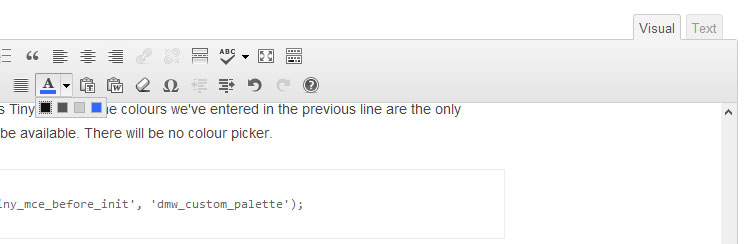
Neat huh? You can read more about this at http://digitalmyway.co.uk/2013/05/custom-colour-palettes-in-tinymce-with-wordpress/